
Contents 13 sections · 6 subsections▼
- What I collected, and why
- The first surprise: almost nothing announces itself
- The second surprise: what breaks is not what I expected
- Measurement, or how to make decisions on false numbers for months
- Backups, or the most expensive illusion
- The money path, or the four minutes that cut your income
- Availability, indexing, versions
- So what should maintenance actually cover, and how often
- What you can check yourself, in ten minutes
- What to ask for in a maintenance quote
- In conclusion
- Frequently asked questions
- What does website maintenance mean?
- How often should website maintenance be done?
- What breaks most often on a website?
- How do I know whether my backup actually works?
- Why is updating plugins not enough?
- How much does website maintenance cost?
- About the author
Website maintenance means finding out that something broke before your customer does. I kept a log of the things that broke, for three months, on my own sites and my clients’. It came to 35. Exactly one of those 35 was flagged by an alert. The rest I found by accident, when someone tried to use the broken thing, or during a check I was running for some other reason.
That number changed what I think maintenance is, and this article is about what I found.
What I collected, and why
In June I started writing down every broken thing I came across: on my site, on client sites, in my own tools. With the date, what broke, how I found out, and how long it had been there.
I did not keep the log in order to write an article. I kept it because memory lies, and when you fix something for the second time you want to know whether it is the same thing or a different one.
Three months in, the log had turned into something almost nobody has: real data about what breaks on websites, instead of opinions about what ought to be maintained.
The first surprise: almost nothing announces itself
Out of 35 logged incidents, exactly one produced an alert. That one was on my own infrastructure, where I had deliberately put a watchdog that knocks on the door.
Every other one surfaced like this:
- when somebody tried to use the broken thing and it did not work;
- when I was looking at something else and noticed the flow was broken;
- when I ran a check somebody had asked for, for an unrelated reason.
This is the part no maintenance offer mentions. A broken website looks exactly like a working one. No warning light comes on. And if nobody is looking on purpose, the fault sits there for months.
What to take from this: the right question to ask whoever maintains your site is not „what do you do every month”. It is „how would you find out if something broke between two visits”. If the answer is „you tell us”, what you have is repairs on request, not maintenance.
The second surprise: what breaks is not what I expected
I grouped the 35 incidents by the kind of check that would have caught them. The order took me by surprise.
| What broke | How many |
|---|---|
| Measurement: analytics, Search Console, the sales funnel | 8 |
| Backups | 6 |
| Availability and access to the site | 5 |
| Indexing, sitemap, crawlers, verified ownership | 5 |
| Security, credentials, email, exposed content | 5 |
| The money path: cart, payment, delivery | 4 |
| Things that broke after an update | 2 |
Look at the last row. Updating plugins, which is precisely what everyone sells under the name of maintenance, produced two incidents out of 35. It matters, of course. But it comes seventh, not first.
And in first place sits something that appears in no maintenance offer at all.
Measurement, or how to make decisions on false numbers for months
Eight incidents. This is the category with the longest silences, because a broken measurement throws no error. It shows you a number. The number looks fine. The number is wrong.
An online store where the purchase event had never been recorded. Not „recorded incorrectly”, it did not exist. And the sessions in which people had actually ordered were missing from the report entirely, two months back. Every decision made in that period was made on a map with a blank patch in the middle.
A site where the data deleted itself after two months, because the retention setting had been left on the factory default. Nobody notices that until the day they want to compare with last year, and last year is no longer there.
A Search Console access account lost for almost a month without anybody noticing. It showed up only when the report was due, and the report went out without the search data.
A store where 97 out of every 100 visits were automated traffic, not people. Three weeks of numbers that could not be read.
What to take from this: once a month, open the report and check the mechanism, not just the numbers. Is the purchase event firing? How many orders did you actually have, according to your accounting, and how many does the report show? If those two do not match, the report has been lying to you for longer than you think.
Backups, or the most expensive illusion
Six incidents, all of them mine, all of them silent. I am telling them on myself, because they are exactly what taught me what a real backup is.
A weekly copy failed and then stopped running. I found out three days later, and only because I was doing something else and happened to look. The log that should have warned me was being written to the very disk that was missing.
A copy of the files holding my credentials had not run for 122 days. Four months in which I believed I had a safety net.
The backup mirror had never once been restored. „We can pick it up from there” was an assumption, not a fact. When I actually tested it, it passed, but the test uncovered three traps that reading had not shown.
An entire folder was being skipped silently, because of a diacritic in its name.
What to take from this: a backup is judged by restoration, not by existence. Ask when it was last restored and how long that took. If there is no answer with a date and a number of minutes in it, what you have is an assumption. And the duration matters just as much: how long the restore takes is how long you sit without a site on the bad day.
The money path, or the four minutes that cut your income
Four incidents, with the highest cost per minute in the whole log.
A completely empty cart page on the live site, caused by one line of styling placed where it did not belong. Here is the part that matters: the code the server sent was correct. A check on the source would have said everything was fine. The page was being assembled in the browser, and that is where it broke.
A „one item per order” limit that could be sidestepped: two items in the cart, double payment, one product delivered.
A paid delivery that failed for a passing reason and stayed failed for good. The admin panel insisted it would retry on its own. It did not. Somebody had paid and received nothing.
What to take from this: once a month, buy from yourself. All the way through, with a real payment, from your phone. It costs five minutes and it catches what no technical check can see.
Availability, indexing, versions
I will group the rest, because they hold the things you already know about.
A site down, once completely, from code I put where it did not belong, and the route to fixing it ran through the very mechanism that had gone down. Access blocked for 17 hours by my own host’s firewall, cutting off the site, the panel and the mail. Search Console ownership dropping to „unverified” after a rebuild, silently. A sitemap listing one product out of nine, and the eight missing ones were the sales pages.
And versions, where one number stayed with me: a plugin on a client site had 22 known vulnerabilities, 13 of them exploitable without a password. Three weeks earlier there had been 16. The number was growing on its own, while nobody touched anything.
The large-scale figures here are published by others and I wrote about them at length in the article on what a properly built website means: over seven thousand new vulnerabilities in a single year across the WordPress ecosystem, almost all of them in plugins. That figure is about WordPress because that is where it gets measured, and it gets measured there because WordPress is the platform with the most things added on top of it. Which is exactly what makes it useful to everyone: the risk does not come from the platform, it comes from what you add on top and then leave untouched, whatever the platform is called.
So what should maintenance actually cover, and how often
Here is the useful part, reordered by what actually broke rather than by what is usually sold.
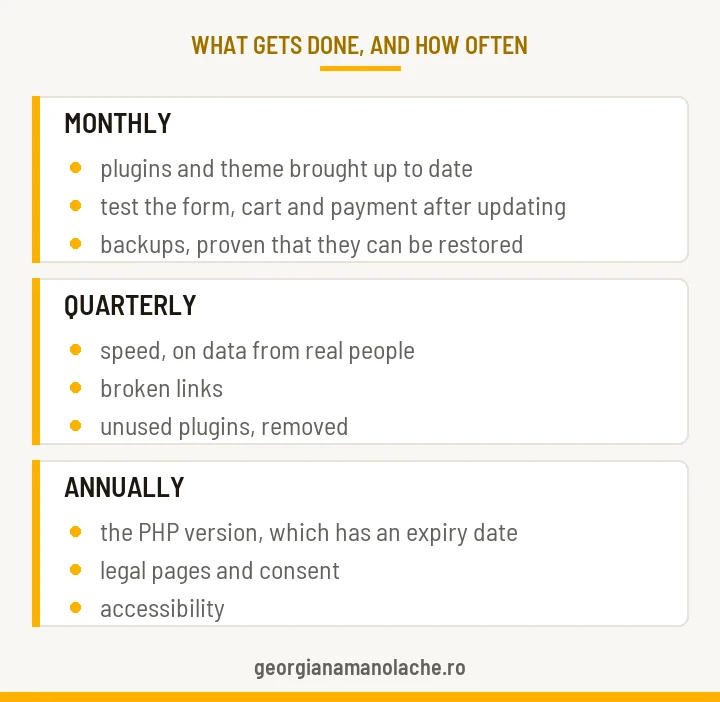
Monthly, in this order:
- Check that the measurement still measures. The important events are actually firing; the data retention setting is not on the default; access to Search Console and analytics still exists; internal traffic is filtered out.
- Buy from yourself, all the way through. Or submit the form, if you do not sell online.
- Check that the backup can be RESTORED, not just that it was made. Every few months, restore it somewhere harmless, and time it.
- Update what needs updating, then repeat step 2. On WordPress that means plugins and the theme, on Shopify or PrestaShop the installed apps, on a custom-built site the libraries it stands on. The trap is the same everywhere: an update can patch a hole and break a button in the same movement.
Quarterly: speed on data from real people, gathered over a 28-day window, against the thresholds Google publishes; broken links; plugins nobody uses any more. Every plugin installed is one more door, and unused doors are still doors.
Annually: the PHP version your site runs on, which has an expiry date and which nobody ever sees. Versions 8.0 and 8.1 are already out of support, and 8.2 goes out on 31 December 2026. If you are on a hosted platform, the version changes without asking you, which sounds convenient and is in fact a different problem: it also changes when you are not ready, and whatever breaks is still yours to fix. Then the legal pages and consent, because they describe a site that has changed since. And accessibility.
Continuously, with a tool rather than with your eyes: whether the site responds, whether the certificate is expiring, whether the domain is expiring. A forgotten domain is lost, and getting it back is expensive and sometimes impossible.
What you can check yourself, in ten minutes
Open your analytics report and count last month’s orders. Compare that with your accounting. If the two do not match, your measurement is lying.
Buy from yourself, from your phone, all the way to payment. If you do not sell online, submit the contact form and see whether it arrives.
Ask whoever keeps your site when the last backup was restored and how long it took. Note whether the answer has a date in it.
And if you want the technical picture without learning the tools, start the free security check: you get the score by email, the problems by severity, and what to do about them. For an online store, where the stakes are higher, it shows best on a real case.
What to ask for in a maintenance quote
Four questions, taken straight from what actually broke in the log.
- How do you find out that something broke between two visits? If the answer is „you tell us”, you are paying for repairs on request, not maintenance.
- What do you check AFTER an update, and on what exactly? A good answer names the money path: form, cart, payment.
- When was the last backup restored, and how long did it take? A good answer has a date and a number of minutes in it.
- What do I receive in writing, every month? A good answer is one page with what was checked, what changed since last month, and what is waiting on a decision from you. Silence between invoices is not a report.
A good supplier answers all four without taking offence. One who takes offence just wants to invoice you.
In conclusion
The log taught me something I did not suspect when I started keeping it: the problem is not that things break. The problem is that they break without anyone knowing.
A site that is down shows up in five minutes. A broken measurement shows up months later, after you have made every decision of the quarter on it. A backup that cannot be restored shows up exactly once, on the day you need it.
That is why good maintenance is not measured in how many buttons somebody presses each month. It is measured in how quickly you find out. And if you want to see where you stand right now, start with the free check or let us look at it together.
Frequently asked questions
What does website maintenance mean?
Finding out that something broke before your customer does. In practice: every month you check that the measurement still measures and that the money path works, you update what needs updating and check afterwards, you periodically prove that the backup can be restored, and you track availability and expiry dates with a tool rather than from memory.
How often should website maintenance be done?
Monthly for measurement, the money path and updates. Quarterly for speed, broken links and unused plugins. Annually for the PHP version, the legal pages and accessibility. Availability and the expiry of your certificate or domain are tracked continuously, with a tool.
What breaks most often on a website?
Out of 35 incidents I logged over three months, on my own sites and clients’ sites, most were in measurement, meaning analytics and Search Console, with eight cases. Then backups, with six. Plugin updates produced two. Exactly one of the 35 was flagged by an alert; the rest surfaced by accident.
How do I know whether my backup actually works?
By asking when it was last restored and how long the restore took. A backup that has never been tested is an assumption: it can run every night and still turn out incomplete on the exact day you need it. I had one that silently skipped an entire folder because of a diacritic in its name.
Why is updating plugins not enough?
Because updates are the seventh cause of incidents, not the first. In my log they produced two out of 35. Measurement produced eight, backups six, and the money path four. Maintenance that only handles updates leaves untouched precisely the areas where the most things break.
How much does website maintenance cost?
It varies widely, because very different things are sold under the same word: from pressing the update button once a month, to actually verifying the measurement and the money path. The question that clarifies the price is how you find out something broke between two visits, and what you receive in writing each month.
About the author

Georgiana Manolache, 22 years in marketing and communication. I build the message and the path that bring you customers, not traffic without sales. I apply buyer psychology through a time-tested method, supported by AI tools.
I wrote the book „Tell Them What They Want to Hear” for entrepreneurs who want to be seen, heard, and chosen by the right customers, without pouring money into channels that have no strategy.
Read next
What a properly built website means, and why yours may not bring customers
The two invisible causes behind a good-looking site that brings nothing.
Read the articleTechnical Audit: What I Found on a Store That Was Crashing
A site can be running and sick at the same time: what shows up only when you check.
Read the articleWhen AI Agents Do the Buying: Marketing’s New Rule
Why ranking #1 on Google is no longer enough, and the five steps to get ready.
Read the article