
Contents 12 sections · 7 subsections▼
- The first cause: nobody finds you
- The second cause: they find you, they come in, they leave
- A new obstacle: do AI assistants cite you?
- Who actually builds a website
- What breaks when a piece is missing
- The sixth case is mine
- Monitoring: what gets watched continuously
- Maintenance: what gets done, how often, and what you risk if it does not
- What you can check yourself, free, in ten minutes
- What to ask for in a quote, so you do not buy an invisible shop window
- In conclusion
- Frequently asked questions
- Why doesn't my website show up on Google?
- How do I check for myself whether Google knows my pages?
- How much does a presentation website cost?
- How fast does my website have to load?
- Does my website have to comply with accessibility law?
- How do I tell whether the person who built my site did the job properly?
- About the author
A properly built website is an instrument that produces something you can count: enquiries, orders, phone calls. To produce anything, it has to pass several tests at once. It has to be found by search engines and by AI assistants, and then by people. It has to be understood in the first few seconds, by people and by algorithms alike. And it has to stay easy to use all the way to the end. A site can look flawless and fail every one of those tests, without the owner finding out for a long time.
You paid for it. It came out beautiful. You showed it to friends and every one of them said it looked great. In the first week you opened it ten times a day, just to look at it.
And then nothing. Nobody calls. You stay among the very few people who ever visit it.
This situation almost always comes down to one of two causes, and both are invisible to the naked eye. That is why nobody tells you about them. Not you, not your friends, not the person who built the site can see them by looking at how it looks.
The first cause: nobody finds you
Your website can be online and, at the same time, not exist as far as Google is concerned, which means it does not exist for the people searching either. Those are two different things, and the second one does not happen on its own.
The engine performs two separate operations. First it reads your pages, which is called crawling. Only then does it decide whether to keep them in its database, which is called indexing. The second one is not guaranteed.
It says so in their own documentation, word for word:
Indexing isn’t guaranteed; not every page that Google processes will be indexed.
They go further and say they do not guarantee that they will crawl, index or serve your page, even if you follow every recommendation they publish.
In their console for site owners there is a status with a name of its own for exactly this, “Crawled, currently not indexed”, which Google explains like this: the page was read, but it was not indexed; it may be indexed in the future, and it may not.
In plain terms: the engine walked into your house, looked through every room, and left without writing you down in its address book.
So what makes it leave? Usually something ordinary, something you can measure in a few minutes. I looked at a shop that was growing by more than 30% a year in its physical location, so the business itself was doing well, and that did not show up for a single one of the four searches through which a customer would have found it online. The measured cause: the home page title was only 16 characters long and contained no relevant keyword at all, and the description used in search results was missing entirely.
To show up when somebody searches for exactly what you sell, the page title has to say what you sell and where you are. It is the very first piece of text the engine reads.
Put simply, his home page never said what he sold or in which city, and Google has no way of guessing. The person searching for the product plus the city got a different shop, even though this one had better products.
What to take from this: open your own home page and read what it says in the browser tab, at the top. If that text does not contain what you sell, and ideally where, you have found a problem in ten seconds, with no tools at all.
Next to titles, indexing decisions also depend on your sitemap, on how your internal links are arranged, on thin or duplicated content, and on authority split between two domains belonging to the same brand. All of those can be checked in minutes. None of them are visible by looking at the site.
The second cause: they find you, they come in, they leave
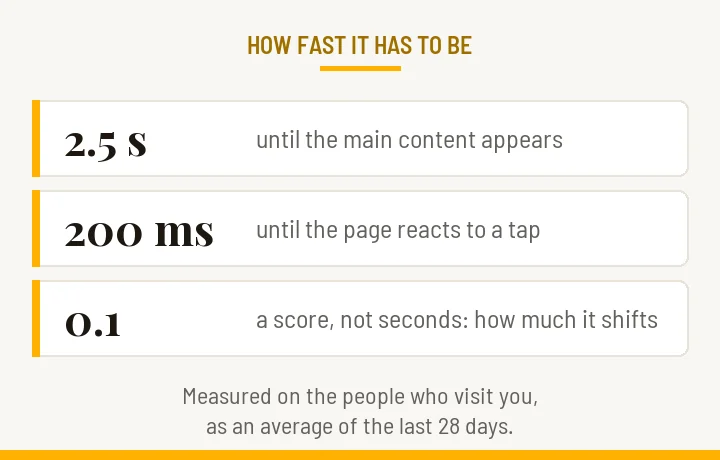
Let us assume you have cleared the first obstacle. The second one comes next, and here Google has published thresholds you can measure, called Core Web Vitals, assessed at the 75th percentile of real page loads:
- 2.5 seconds for the main element of the page to appear
- 200 milliseconds for the page to react when someone taps
- 0.1 for how much the content jumps under your finger while you read. This one is not measured in seconds. It is a score, and it grows the more the page moves under you. You go past 0.1 if you have ever tapped a button and hit a different one, because an image finished loading above it in the meantime
Past those thresholds, the visitor leaves before finding out what you sell. And people are also lost to things that show up in no measurement at all: a confusing visual hierarchy, a form asking for ten fields when three would have done, text describing the product in technical terms instead of translating it into something the visitor gains, a button that does not look like a button, and so on.
Almost everyone arrives on a phone. The site you approve on a large screen can be a different thing on a screen ten centimetres wide: buttons too small for a thumb, text the size of an ant, one image that covers everything and pushes the content below the fold. Google looks at the phone version when it decides where you stand, not at the desktop one. Open your own site on your own phone and try to place an order, all the way through. Whatever irritates you will send a stranger straight back to Google, and from there to a competitor who was better prepared.
I have also seen what that costs. In one case I measured recently, 13,079 RON spent on ads brought 3.9 million impressions and zero recorded conversions. The ads had done their job, the people really did arrive. What was missing was everything that happens after the click: the page they landed on never told them plainly what they would gain, and never asked them to do anything specific.
What to take from this: ad money does not repair a page that fails to convince. It simply buys you, at a higher price, more people who will leave.
One detail trips up a lot of people. The real data, from your own visitors, is gathered over a rolling 28-day window. Today’s report shows the average of the last four weeks, not today. A fix made this morning appears there weeks later, so there is no point repairing something and checking the next day.
A new obstacle: do AI assistants cite you?
Everything so far has been about Google. For a couple of years now, some people have stopped searching. They ask. And the assistant answers by citing pages, like a search engine without a list of results. If your page is not among the ones it cites, then as far as that person is concerned you do not exist, even if you rank perfectly well in Google.
This work has a name, two in fact: AEO, optimisation for the engines that answer, and GEO, optimisation for the ones that generate the answer. Behind the acronyms sit three concrete things that very few people know.
The robots are not one robot. OpenAI runs several, with different jobs, set out in their documentation: GPTBot collects text to train the models, while OAI-SearchBot is the one that decides whether you appear as a source inside ChatGPT’s answers. Anthropic draws the same distinction, ClaudeBot for training and Claude-SearchBot for answers. The consequence gets missed all the time: block the training robot and you have not left ChatGPT. Block the search one and you have.
There is no button to sign up. With Google you have Search Console and you can ask for a URL to be indexed. With OpenAI, Anthropic or Perplexity there is nothing of the kind. You cannot ask to be included. One road remains: being linked to and quoted in places they already crawl.
Your own hosting can block them without telling you. On this point I have a story of my own, and it is about this very site. My host’s security provider ships a rule set that refuses sixteen AI robot identities outright. The server was answering with a refusal code before WordPress even woke up, including on the request for the file where a site declares who is allowed in. Googlebot went through untroubled. The AI robots did not.
None of that is visible on screen, and no public tool will tell you. I found out by reading my hosting access log, where I checked every address against the lists the providers publish, so as not to mistake a genuine robot for somebody pretending to be one. I asked for an exception. After fourteen days without an answer, I put a network layer in front of the site that lets verified robots through. The final proof, meaning one of their requests actually going through, is read from the logs as well, and logs have their own delay.
And there is one more thing, which no firewall repairs: two of the robots I was expecting never came at all, on any day covered by the logs I hold. Having your gate shut is one problem. Having nobody turn up at the gate is a different one. The second is solved through links and citations in places they already crawl, and it is a great deal harder than a server rule.
What to take from this: if you want to appear in what the assistants answer, the first thing to check is not the text on your page. It is whether their robots are allowed in at all, and the answer to that lives in your hosting log, not on your screen. Only after that do you look at the structure of the page and the technical settings behind it.
Who actually builds a website
Here is the heart of it, and it is the part nobody puts in a quote.
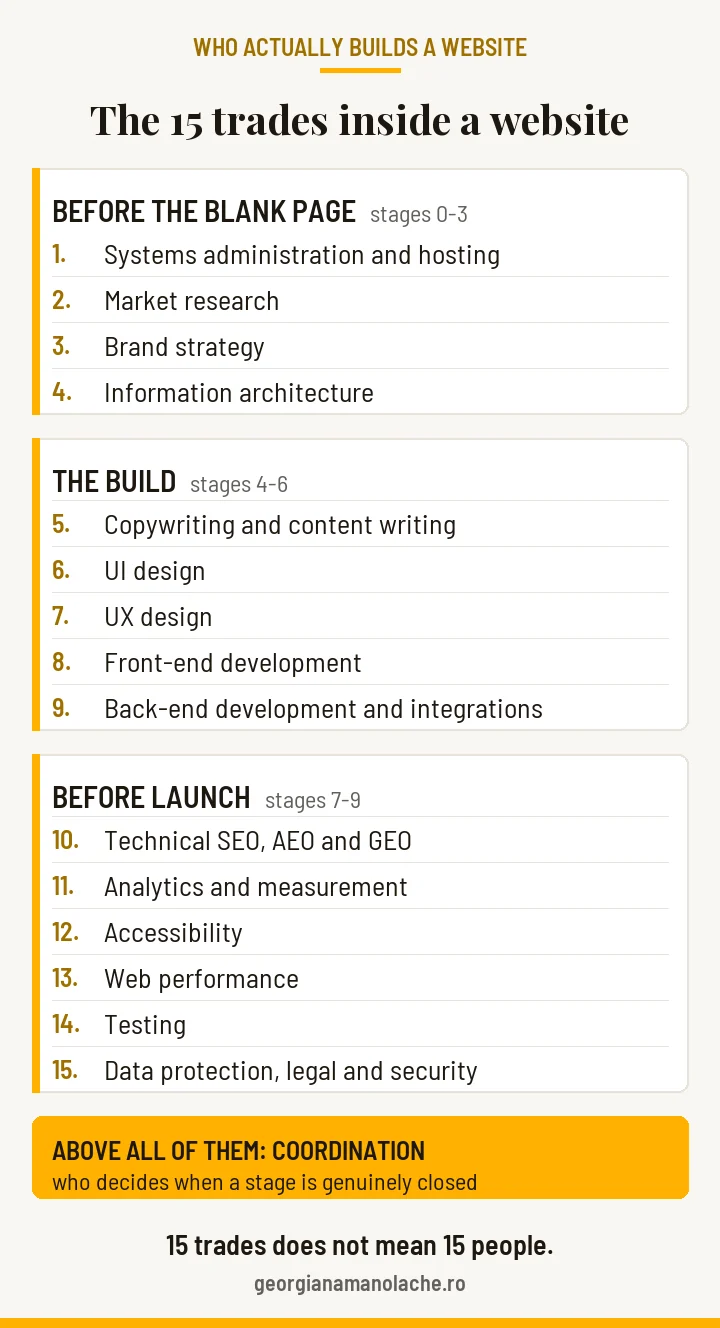
A website is not a shop window. It is an instrument, and an instrument has parts. Every part calls for a different trade. Along the route I follow on every project, from the blank page to well after launch, fifteen distinct trades are involved:
- Systems administration and hosting. The computer your site sits on, somewhere in the world. Whoever looks after it makes sure it answers quickly, does not fall over, and that a copy exists from which everything can be rebuilt if something breaks.
- Market research. Who the buyer is, what hurts, what they are afraid of, and which words they use when they search. Their words, not the ones from your brochure.
- Brand strategy. What you promise, to whom, and why they would choose you over the neighbour who does the same thing.
- Information architecture. The map of the site: which pages exist, how they connect, and the route a person takes from the front page to the order button. This is also where it is decided whether you will be indexed and visible at all.
- Copywriting and content writing. Two kinds of writing with different jobs. Copywriting is the text after which you expect an action: a call, an order, an email address. Content writing is the text that explains and clarifies, like the article you are reading now. A site needs both, in different places; the difference in full is in what copywriting is.
- UI design. How it looks: the colours, the size of the letters, the space between things, the way a button looks like a button. The part you see.
- UX design. How it is used: how many steps the road to an order takes, what the form says, what happens when somebody gets something wrong. The part you feel.
- Front-end development. Building what you see and touch in the browser, which means turning the drawing into a page that actually works.
- Back-end development and integrations. What happens behind the scenes, where you cannot see: the admin panel, the payment that reaches the bank, the order that goes to the courier, the invoice that gets issued, the stock that goes down.
- Technical SEO, plus AEO and GEO. Everything that makes the page visible: the title you appear under in Google, the description below it, the map you hand the engine, the markup behind the scenes that tells it what all this is about. And now also the part that makes you quotable by AI assistants.
- Analytics and measurement. The counting: how many people came in, how many sent the form, how many bought. And, more importantly, whether those numbers really measure what you think they measure.
- Accessibility. So the site can also be used by somebody who cannot see well, cannot use a mouse, or listens to the page through software that reads it out loud.
- Web performance. How fast the page loads on an ordinary person’s phone, on their connection, not on the computer of the person who built it.
- Testing. Somebody who checks, after every change, that nothing else broke. On the phone above all, since that is where most people look.
- Data protection, legal and security. The cookie banner done properly, policies that actually tell the truth, plugins kept up to date, passwords that are not left lying around, and content that does not land you in fines or legal trouble.
And above all of them, coordination. Somebody who keeps the phases in order and decides when a stage is genuinely closed, rather than taking the word of whoever did it. Without that, design happens before structure, the text gets written after the thing is built, and measurement is installed after launch, by which point the first weeks are already lost.
Fifteen trades does not mean fifteen people. In a small business one person wears several hats, and that is how I work too. What cannot be done is to wear no hat at all for one of the pieces and still expect an instrument at the end. The number of trades should not shrink with the budget. Because if they do shrink, you have to understand that what you are buying is not an instrument. It may well be a shop window nobody can find.
What breaks when a piece is missing
Six cases from real audits, anonymised. You have read two of them already, the invisible shop and the ad money with no conversions. Three more are below, and the sixth is mine, which I am telling on myself. What they have in common is that every one of them passed the “it looks good” test. Not one of them was visible to the naked eye. They all failed on measurement.
Measurement was missing. An event named “sign-up” had collected 111 triggers, 104 of them on presentation pages, on the plain click of a button. The genuine sign-ups could be counted on one hand. In other words, what was being counted was the press of a button, not the person who made it all the way through. Had that number gone into the monthly report as the headline figure, it would have shown dozens of times more than reality, and decisions would have been made on it.
What to take from this: before you celebrate a number, ask what exactly makes it go up.
Measurement was missing in another way. The data retention setting had been left on the factory default, so the history quietly deleted itself after a few months. On the day you would have wanted to compare this month with the same month last year, last year was no longer there.
What to take from this: if you ever intend to compare periods, check your data retention setting today. In a year it is too late, because deleted data does not come back.
Performance was missing. A free tool gave the page a score of 69, so it looked slow. Measured in a real browser, it loaded in 2.7 seconds. The explanation: the tool was downloading a version eight times heavier than the one served to actual people, so its score was worse than reality.
What to take from this: a score from a free tool is a signal that something is worth a look. It is not a verdict. The verdict comes from data measured properly, on the people who actually visit.
The sixth case is mine
Last week I installed my payment provider’s plugin on my own site. You hand it your private key as a file, and it uploads that file into the public uploads folder, copies the contents into the database, and never deletes the file. I requested my own file from the outside, as any stranger would. It answered with a 200 and downloaded.
It was the test key, not the one with money behind it, because I had not reached the production stage yet. The very same path would have published the real key two days later, if I had not looked.
Nobody caught me at it and nobody was harmed. I found it because I am in the habit of checking where a file ends up when I hand it to a plugin. I deleted the key, added a rule to the folder that refuses certificate and key extensions, and then did the part everyone skips: I tested the rule against a file that actually exists. A file that does not exist answers “I don’t have it” regardless, so it proves nothing. Only a real file, refused with “you are not allowed”, shows that the rule is doing its job.
Put simply, a payment plugin left my access credentials in a public folder on the site, where anyone who asked for them could take them. Nothing about it was visible on screen.
What to take from this: when you hand a program a password, a key or a certificate as a file, ask where that file ends up. And if you add a rule to protect it, test the rule against a file that genuinely exists. An invented file answers “I don’t have it” anyway, so it proves nothing to you.
I am writing it here for the same reason I wrote the whole article: these pieces are not visible to the naked eye at my place either. They only become visible if you measure them.
Monitoring: what gets watched continuously
A website is not a finished object. It is a system living in an environment that changes without asking you: Google changes its rules, plugins get updates, suppliers change their interfaces, the law moves.
Monitoring means you learn about the changes before they cost you. Six things are watched continuously: whether the site answers, how many pages Google knows about, the three speed thresholds, server errors and pages that no longer exist, the expiry of the certificate and the domain, and the business numbers compared with last month.
Any one of them can fail without anybody noticing. A site can be down for hours if nobody happens to open it in that window, and a forgotten domain is lost for good.
Maintenance: what gets done, how often, and what you risk if it does not
This is where the numbers are clearest in the whole article.
Patchstack, a company specialising in WordPress security, reported for 2024 a total of 7,966 new vulnerabilities across the WordPress ecosystem. 96% of them were in plugins and 4% in themes, while the platform core accounted for seven, none of them severe enough to put sites at risk on any large scale. In the first half of 2025 the pace picked up, 6,700 new vulnerabilities in six months, with a single one found in the core.
The practical conclusion is both uncomfortable and useful: the platform itself is reasonably safe. What exposes you is everything added on top of it and then left un-updated.
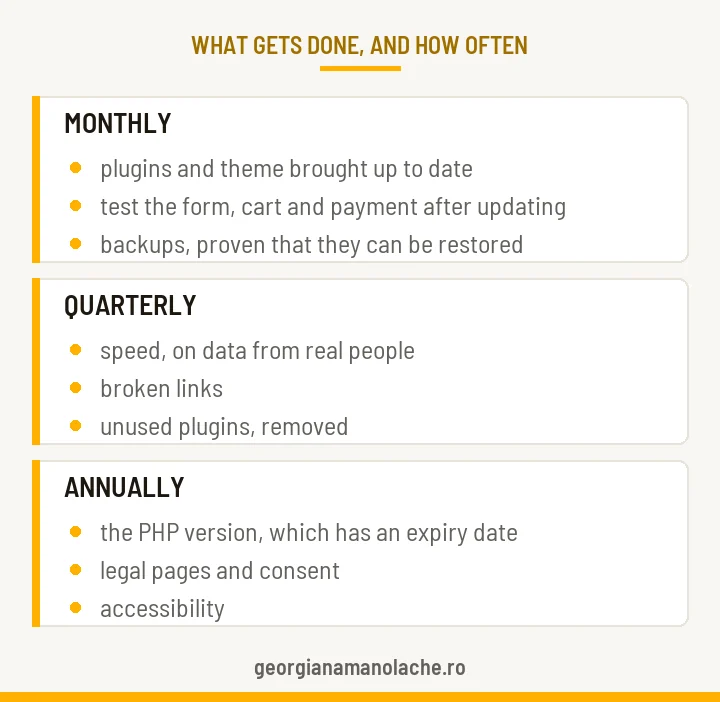
Different things happen at different intervals: monthly, the updates and a check that the measurement still measures; every three months, speed on real data, broken links and plugins nobody uses any more; once a year, the versions that carry an expiry date and the legal side.
What exactly goes into each interval, in what order and why that order in particular, I wrote separately, in website maintenance. There I start from a log of 35 real incidents, and the order that comes out of it is not the one everybody sells.
One item from the annual list is worth spelling out right here, because a great deal more gets repeated in conversation than is actually written in the law: accessibility.
From 28 June 2025, through the European Accessibility Act, transposed in Romania as Law 232/2022, digital accessibility became a legal obligation for a limited list of services: e-commerce, consumer banking, electronic communications, access to audiovisual media services, and e-books.
So a presentation site that does not sell online is not on the list. And micro-enterprises providing services, meaning under 10 employees and under 2 million euro in turnover or balance sheet total, are expressly exempt, even when they do sell online. If somebody tells you that you absolutely have to pay for compliance, ask them which of the categories above you fall into.
What does not change with the law: a site that somebody navigating by keyboard cannot use loses customers, whether or not anyone is obliged to fix it.
What happens when maintenance is missing. Across the first 44 websites checked with my free security scanner, none of them mine and none of them belonging to my clients, the average score was 53 out of 100. Thirty-two out of 44 had work to do, which is close to three in four. Exactly half, 22, had at least one serious problem. Not one of them scored full marks.
Those numbers come with a caveat, and I would rather state it than hide it: the sample is small, and it is made up of people who chose to check their own site, so they are already more attentive than average. Which means reality is probably worse than the numbers, not better.
What to take from this: if you have done nothing in particular to your site over the past year, the odds are on the side of the problems, not on yours. Not because you did something wrong, but because things break by themselves when nobody is looking at them.
What you can check yourself, free, in ten minutes
You do not need anyone for the first three checks.
Are you indexed? Type site: into Google immediately followed by your address, with no space: site:yoursite.com. It shows you roughly how many of your pages the engine knows about. If the number is zero, or far lower than your real page count, you have already found a problem. Do not confuse indexing with visibility, though. You can be indexed and still be buried, if Google does not consider the site trustworthy enough to bring forward.
Would a customer who does not know your name find you? Search for the product or service plus the city, exactly as they would. Do you come up on the first page? If not, the causes are technical, and bad luck is not among them.
How fast is it? Put the address into PageSpeed Insights and look at the three values at the top, the ones in the section with data from real users.
Beyond those, also free: Google Search Console for indexing status page by page, axe DevTools or WAVE for accessibility, Mozilla’s HTTP Observatory for the server’s security configuration. If you run an online shop the stakes are higher, and it shows best on a real case, a shop that was falling over.
And if you want the full picture without learning the tools, there are four automated checks here on my site, each covering a different area from the ones above. All four start free, and the security one emails you the score and the number of problems by severity, along with what to do about them.
- Security, meaning what the outside world can see about your server and your plugins. Risks here do not announce themselves. You find out when a client rings you because they paid a fake invoice, sent from an address that looked like yours.
- Cookies and consent. One complaint is enough: any unhappy visitor can report you to ANSPDCP, the Romanian data protection authority, and the ceiling on the fine rises with your turnover.
- Legal notices and accessibility. The complaint does not always come from a customer. A competitor can report you to ANPC, the consumer protection authority, over a single missing line in your footer, and once an inspection starts it looks at the whole site.
- Visibility and conversion, which is precisely the two causes from the start of this article. The loss here is a silent one: the customer who cannot find you complains to nobody, buys from a competitor, and you never learn that you could have been the one selling to them.
What to ask for in a quote, so you do not buy an invisible shop window
Four questions that change the conversation with any supplier:
- Who handles each of the fifteen trades? If the answer is “we do everything”, ask for the list of checks at each stage, and for access to the accounts created in your name.
- What does “done” mean? Ask for measured acceptance criteria: speed, accessibility, indexability, measurement installed before launch.
- What do I get at the end? The access credentials, ownership of the analytics and Search Console accounts, the source files, the documentation.
- What happens after launch? What maintenance covers, how often, and who answers when the site goes down on a Saturday night.
A good supplier answers all four without taking offence. One who takes offence has already answered them.
In conclusion
A website that looks good and produces nothing is an expense that grows over time, not an investment. The difference between the two lies in the pieces nobody sees: the architecture that makes it visible, the experience that makes it easy to use, the measurement that tells you whether it works, and the upkeep that keeps it alive.
The good news is that none of this is magic. It can be measured, repaired and maintained. And the first three checks you can partly do yourself, in ten minutes, right now.
If you want to see where you stand before making any decision, start with those. And if you want the full picture without learning the tools, start the free security check and, while the result makes its way to your inbox, run the other three above as well. It takes a few minutes and costs you nothing. What you get is the real state of your site.
And if the numbers frighten you, it only means you found out earlier than most. From there we can either work together or you take the pieces on one at a time yourself.
Frequently asked questions
Why doesn’t my website show up on Google?
Most often because Google read your pages and chose not to keep them in the index. Those are two different operations, and the second is not guaranteed, as their own documentation says. The usual causes take minutes to measure: titles that do not say what you sell or where you are, a missing description, an incomplete sitemap, thin or duplicated content.
How do I check for myself whether Google knows my pages?
In a few seconds, using the site: operator typed immediately before your address in search. The number of results tells you, roughly, how many of your pages the engine has kept. Compare it with how many pages the site actually has: if the gap is wide, you already have something to pull on. For the exact picture, page by page, you need Google Search Console, which is free and gets set up once.
How much does a presentation website cost?
It depends on how many of the fifteen trades somebody actually performs and how many get skipped. A low price rarely means fewer features. It usually means missing stages: the research, the writing, the measurement, the checks before launch. The question that helps you on the phone is what the price covers, named stage by stage, and what you receive at the end.
How fast does my website have to load?
Google has published three thresholds, measured on your real visitors: 2.5 seconds for the main element to appear, 200 milliseconds for the page to react to a tap, and a score of no more than 0.1 for how much the content jumps under your finger. That last one is not measured in seconds. It is a score, and it grows the more the page moves under you. The data is gathered over a 28-day window, so a fix made today shows up in the report weeks later.
Does my website have to comply with accessibility law?
It depends what you sell. From 28 June 2025, Law 232/2022, the Romanian transposition of the European Accessibility Act, makes digital accessibility mandatory for a limited list of services: e-commerce, consumer banking, electronic communications, access to audiovisual media services, and e-books. A presentation site that does not sell online is not on that list. Micro-enterprises providing services are expressly exempt, even when they sell online.
How do I tell whether the person who built my site did the job properly?
You judge by four answers, not by how the site looks. Ask for the list of trades that went into the project, by name. Ask which measured criteria established that it was “done”. Check that you received everything that belongs to you: the access credentials, the analytics and Search Console accounts in your own name, the source files. And settle what happens after launch, who repairs things and how quickly. How they react to these questions tells you as much as the answers do.
About the author

Georgiana Manolache, 22 years in marketing and communication. I build the message and the path that bring you customers, not traffic without sales. I apply buyer psychology through a time-tested method, supported by AI tools.
I wrote the book „Tell Them What They Want to Hear” for entrepreneurs who want to be seen, heard, and chosen by the right customers, without pouring money into channels that have no strategy.
Read next
Technical Audit: What I Found on a Store That Was Crashing
A site can be running and sick at the same time: what shows up only when you check.
Read the articleWhen AI Agents Do the Buying: Marketing’s New Rule
Why ranking #1 on Google is no longer enough, and the five steps to get ready.
Read the articleWhat is copywriting and why your text doesn’t sell
Same offer, two texts, different results: what changes when the writing changes.
Read the article